Flow Designer Palette
Redesigning the Flow Designer Palette for speed, clarity, and flexibility.
Role: Lead Designer
Context: Completed as a 555 innovation project in partnership with a Dev Team Lead
Context
Each month, we had one “555” innovation day to explore improvements outside the roadmap. For this project, I partnered with a Dev Team Lead to rethink one of the most heavily used and most frustrating parts of the Flow Designer: the step palette.
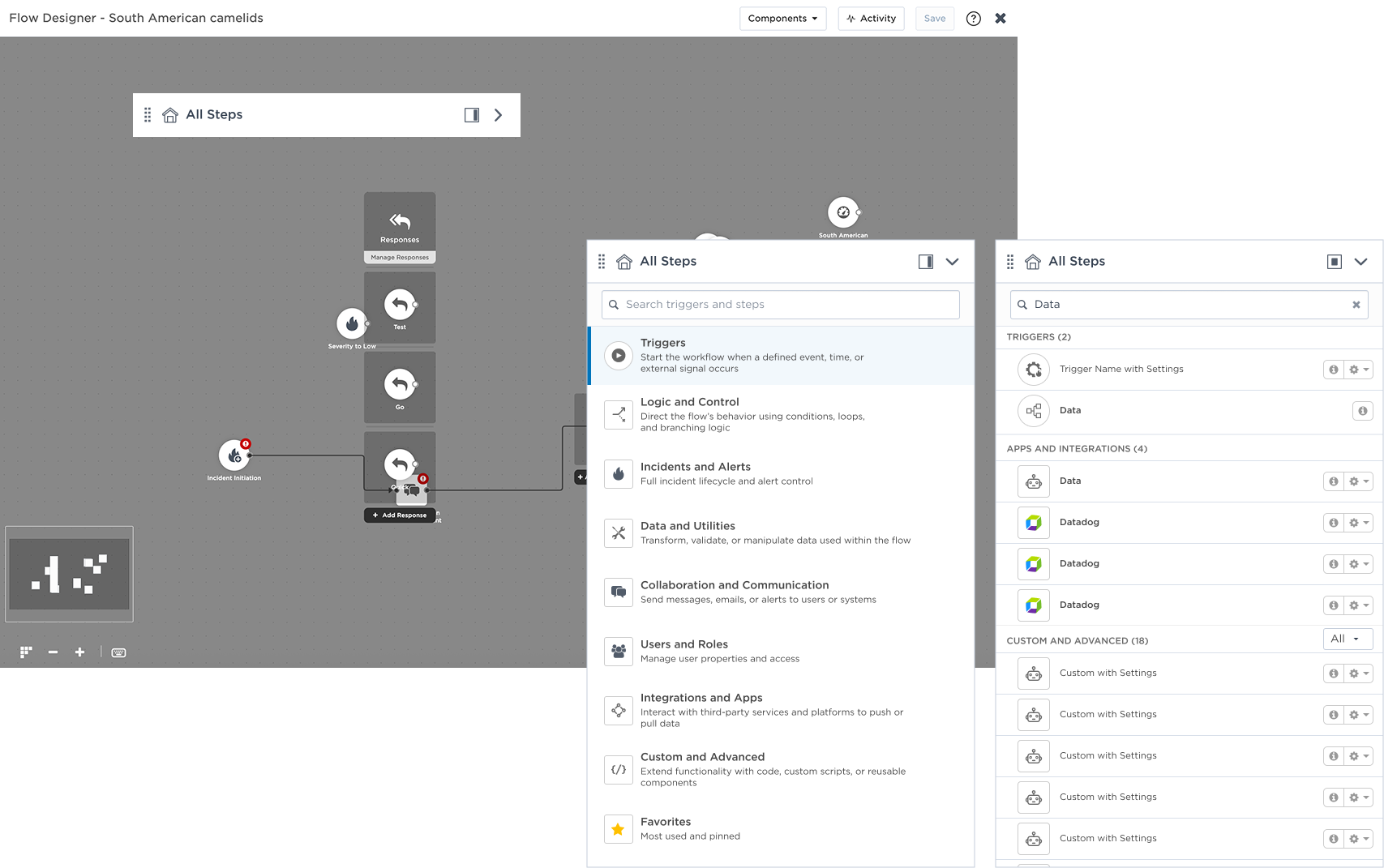
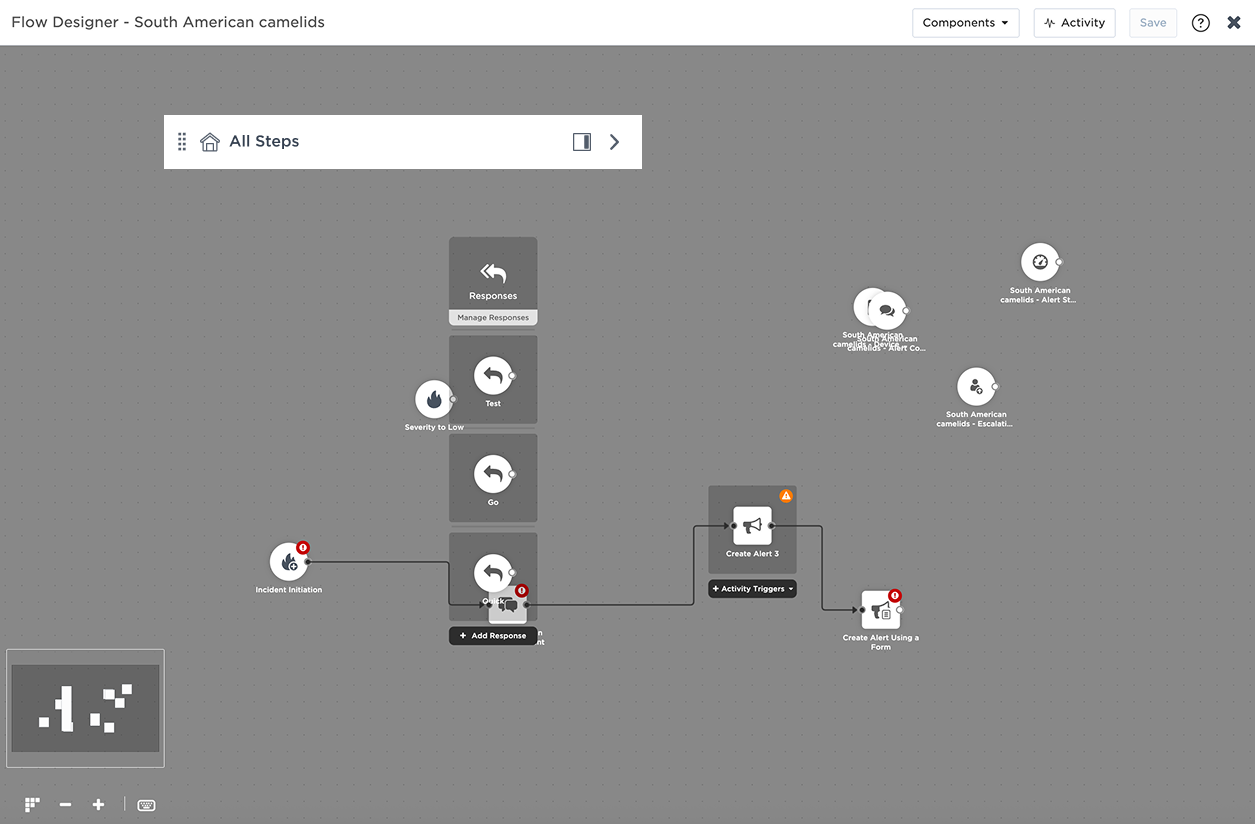
What began as a pet project evolved into a usability-driven redesign of the xMatters Flow Designer palette, introducing detachable panels, cross-tab search, favorites, and a new intent-based categorization model aligned with how users actually work.
Problem Space
The Flow Designer palette had evolved organically — and it showed. Users faced:
- Tabs grouped by backend source, not intent
- Poor step discoverability
- No cross-tab search
- A fixed, docked layout that limited workspace
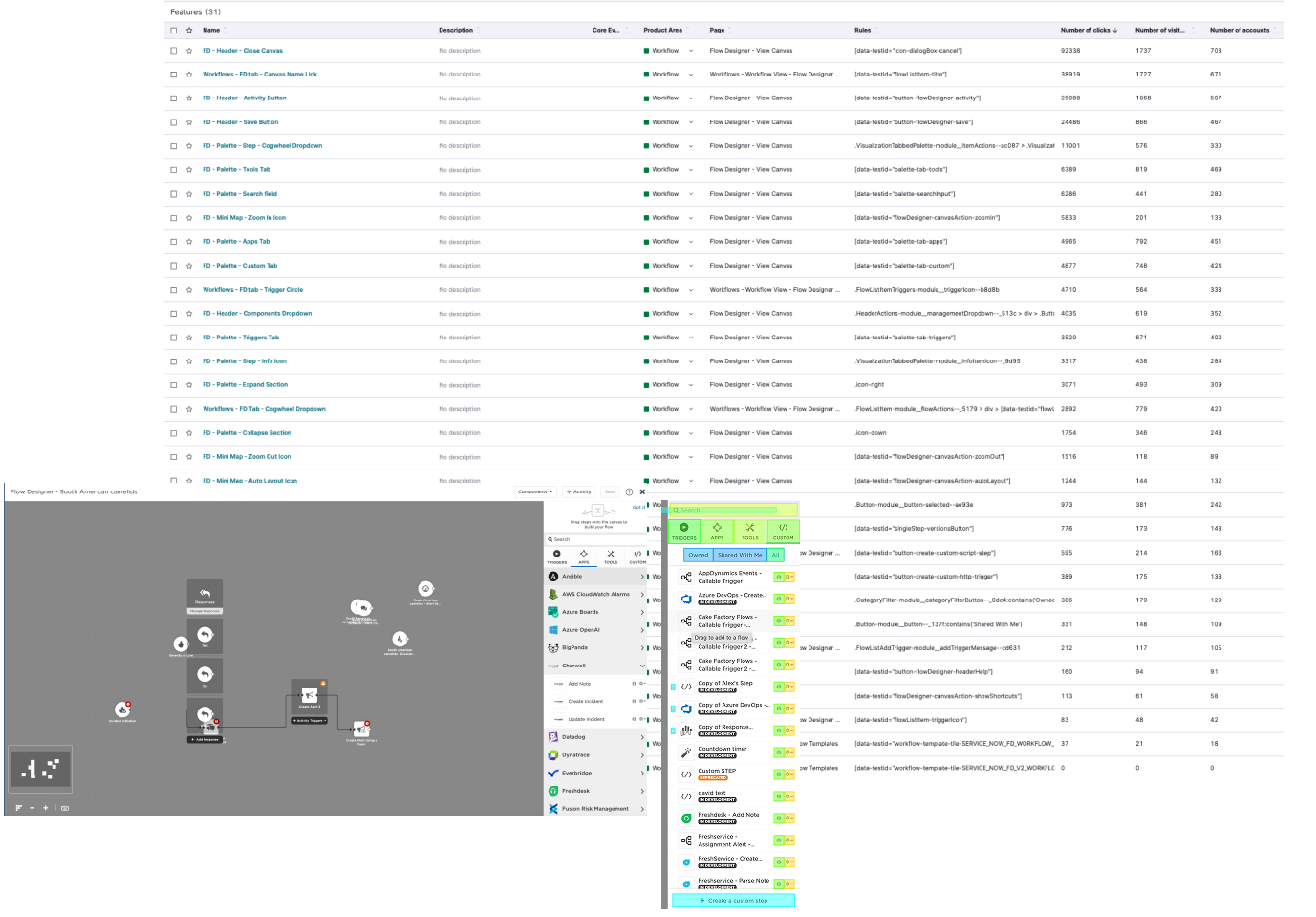
Pendo data and enhancement requests revealed:
- Heavy reliance on a small subset of steps
- Underused categories adding clutter
- Frequent tab switching during flow creation
- Time lost searching for the right step
The palette worked - but it wasn’t designed around real user behaviour.
The Core Design Challenge
How might we redesign the palette to reflect user intent rather than system architecture - without breaking existing mental models?
We needed to:
- Improve discoverability without overwhelming users
- Reduce friction in flow-building workflows
- Support power users without complicating the UI
- Make the workspace more adaptable
This was not just a visual redesign - it required rethinking structure, hierarchy, and interaction behaviour.
Key Design Considerations
- Preserve familiar visual patterns to reduce relearning
- Make improvements progressive - not disruptive
- Support both novice and expert users
- Encourage reuse through Favourites
- Align structure with workflow behavior
Strategy
Data-Informed Diagnosis
I:
- Tagged Flow Designer elements in Pendo
- Analyzed click distribution and usage patterns
- Reviewed enhancement requests and user feedback
- Identified step clustering by behavior rather than backend source
-
This allowed us to move beyond assumptions and ground decisions in actual behavior.
Structural Reorganization
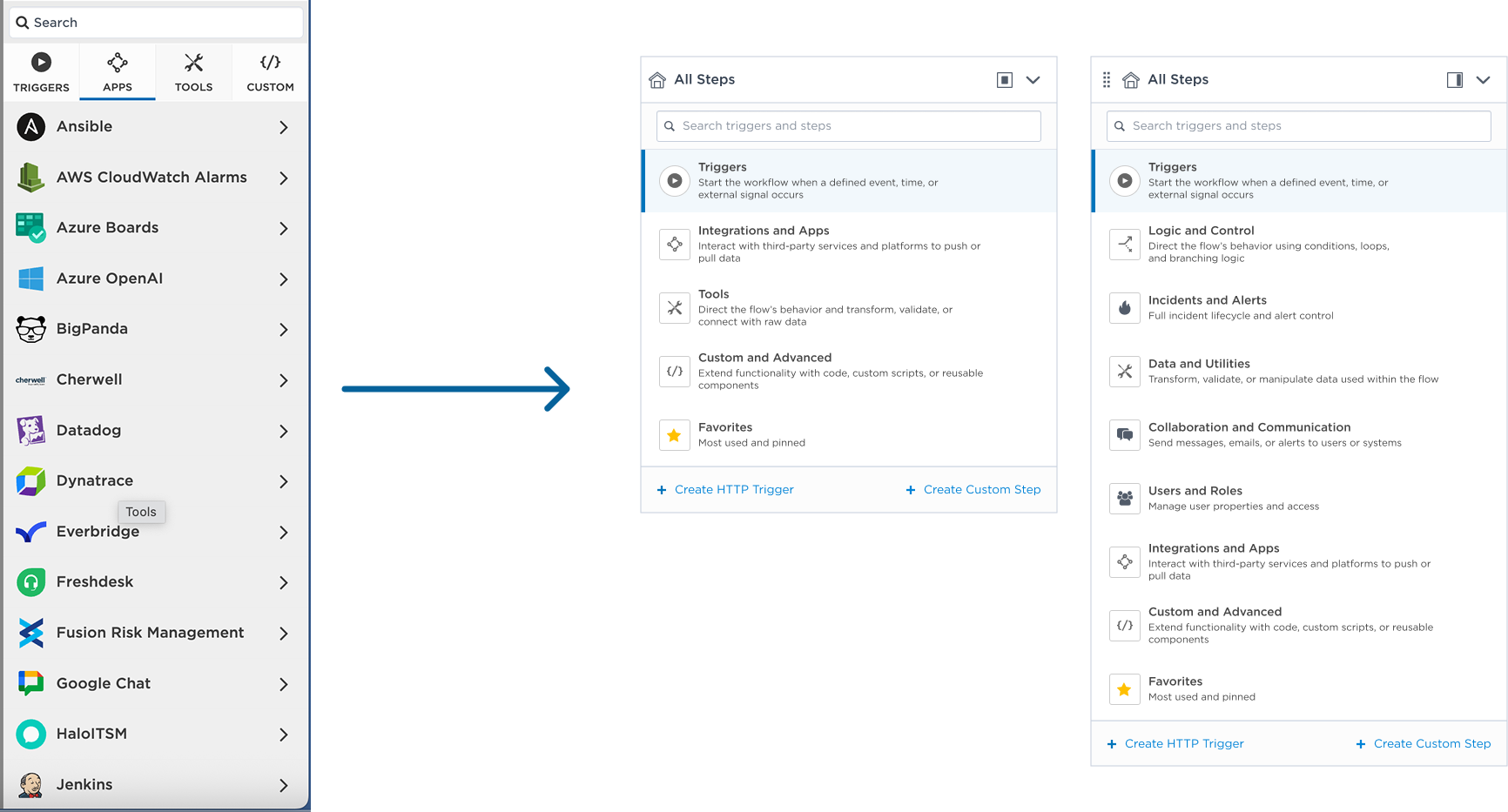
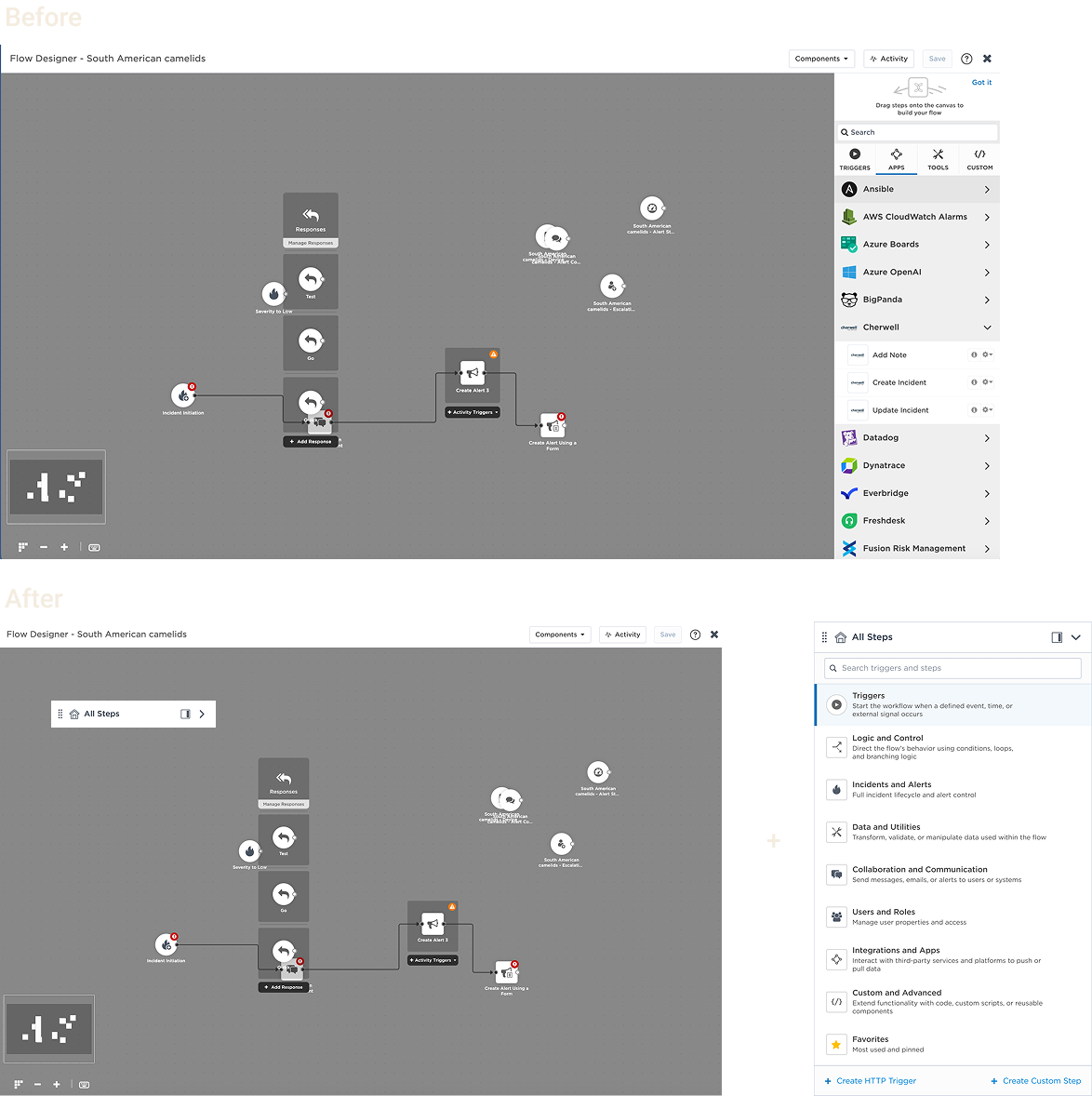
Instead of organizing by system ownership (Triggers, Apps, Tools, etc.), we introduced:
- Logic & Control
- Incidents & Alerts
- Data & Utilities
- Collaboration
- Users & Roles
- Integrations
- Custom & Advanced
Grouped by what users are trying to accomplish and not where the step comes from.
Smarter Discovery
Introduced:
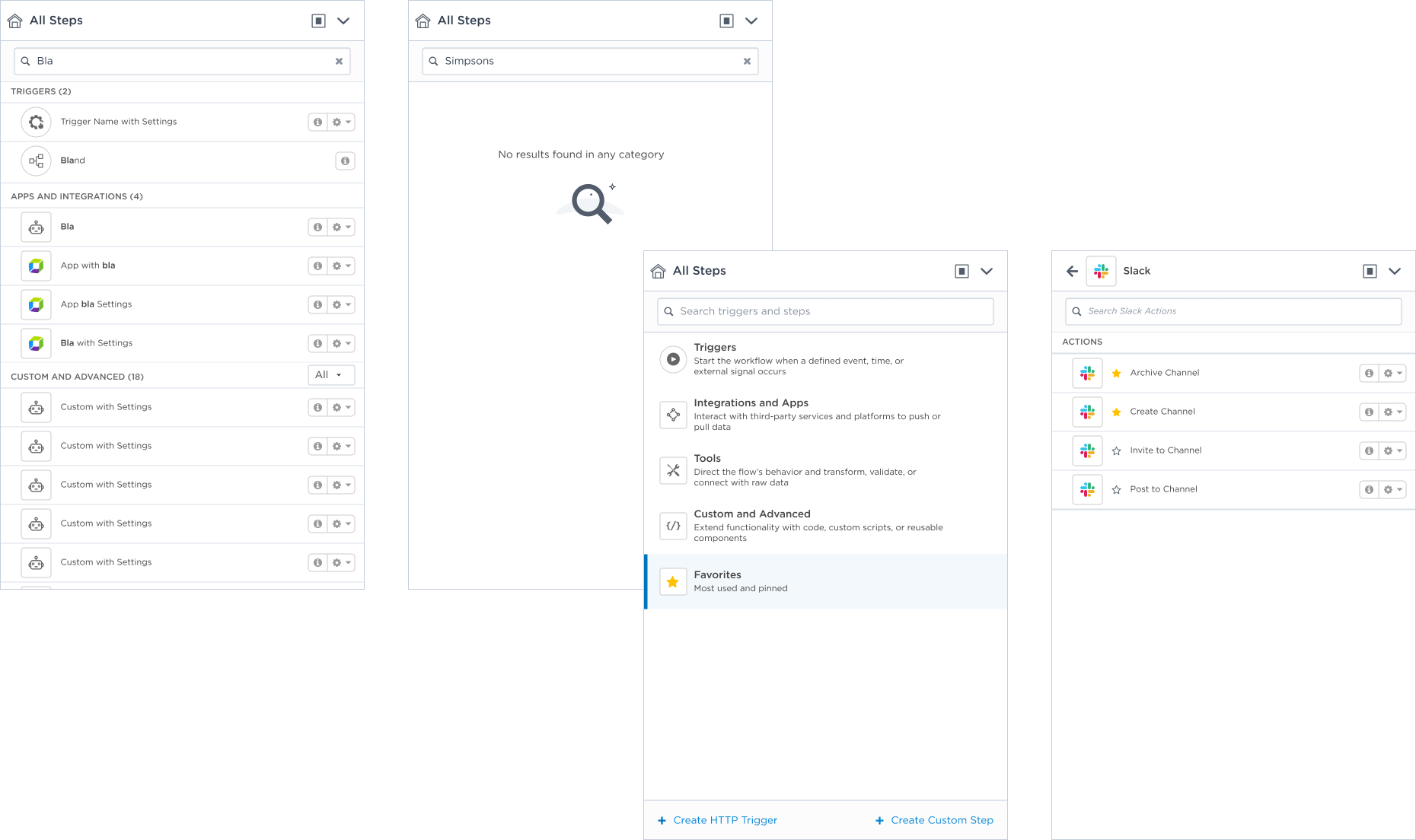
- Search across all tabs
- Favorites (pin high-use steps)
- Default view set to “All”
- Reduced tab clutter
This reduced cognitive load and repetitive navigation.
Flexible Workspace
Introduced:
- Search across all tabs
- Favorites (pin high-use steps)
- Default view set to “All”
- Reduced tab clutter
This reduced cognitive load and repetitive navigation.
Outcomes
While this was an innovation-day project, it demonstrated:
- A validated alternative structure grounded in usage data
- Reduced step-finding friction
- Clear alignment between UI organization and user intent
- Increased personalization potential
- Strong cross-functional collaboration between design and engineering
It became a reference direction for future usability improvements in Flow Designer.
Daria Ershova

Flow Designer Palette
Redesigning the Flow Designer Palette for speed, clarity, and flexibility.
Role: Lead Designer
Context: Completed as a 555 innovation project in partnership with a Dev Team Lead
Context
Each month, we had one “555” innovation day to explore improvements outside the roadmap. For this project, I partnered with a Dev Team Lead to rethink one of the most heavily used and most frustrating parts of the Flow Designer: the step palette.
What began as a pet project evolved into a usability-driven redesign of the xMatters Flow Designer palette, introducing detachable panels, cross-tab search, favorites, and a new intent-based categorization model aligned with how users actually work.
Problem Space
The Flow Designer palette had evolved organically — and it showed. Users faced:
- Tabs grouped by backend source, not intent
- Poor step discoverability
- No cross-tab search
- A fixed, docked layout that limited workspace
Pendo data and enhancement requests revealed:
- Heavy reliance on a small subset of steps
- Underused categories adding clutter
- Frequent tab switching during flow creation
- Time lost searching for the right step
The palette worked - but it wasn’t designed around real user behaviour.
The Core Design Challenge
How might we redesign the palette to reflect user intent rather than system architecture - without breaking existing mental models?
We needed to:
- Improve discoverability without overwhelming users
- Reduce friction in flow-building workflows
- Support power users without complicating the UI
- Make the workspace more adaptable
This was not just a visual redesign - it required rethinking structure, hierarchy, and interaction behaviour.
Key Design Considerations
- Preserve familiar visual patterns to reduce relearning
- Make improvements progressive - not disruptive
- Support both novice and expert users
- Encourage reuse through Favourites
- Align structure with workflow behavior
Strategy
Data-Informed Diagnosis
I:
- Tagged Flow Designer elements in Pendo
- Analyzed click distribution and usage patterns
- Reviewed enhancement requests and user feedback
- Identified step clustering by behavior rather than backend source
-
This allowed us to move beyond assumptions and ground decisions in actual behavior.
Structural Reorganization
Instead of organizing by system ownership (Triggers, Apps, Tools, etc.), we introduced:
- Logic & Control
- Incidents & Alerts
- Data & Utilities
- Collaboration
- Users & Roles
- Integrations
- Custom & Advanced
Grouped by what users are trying to accomplish and not where the step comes from.
Smarter Discovery
Introduced:
- Search across all tabs
- Favorites (pin high-use steps)
- Default view set to “All”
- Reduced tab clutter
This reduced cognitive load and repetitive navigation.
Outcomes
- A scalable integration foundation
- Reduced manual data management
- Greater confidence in automated sync processes
- A reusable model for future external systems
Flexible Workspace
Introduced:
- Search across all tabs
- Favorites (pin high-use steps)
- Default view set to “All”
- Reduced tab clutter
This reduced cognitive load and repetitive navigation.
Outcomes
While this was an innovation-day project, it demonstrated:
- A validated alternative structure grounded in usage data
- Reduced step-finding friction
- Clear alignment between UI organization and user intent
- Increased personalization potential
- Strong cross-functional collaboration between design and engineering
It became a reference direction for future usability improvements in Flow Designer.
Daria Ershova
Flow Designer Palette
Redesigning the Flow Designer Palette for speed, clarity, and flexibility.
Role: Lead Designer
Context: Completed as a 555 innovation project in partnership with a Dev Team Lead
Context
Each month, we had one “555” innovation day to explore improvements outside the roadmap. For this project, I partnered with a Dev Team Lead to rethink one of the most heavily used and most frustrating parts of the Flow Designer: the step palette.
What began as a pet project evolved into a usability-driven redesign of the xMatters Flow Designer palette, introducing detachable panel, cross-tab search, favourites, and a new intent-based categorization model aligned with how users actually work.
Problem Space
The Flow Designer palette had evolved organically — and it showed. Users faced:
- Tabs grouped by backend source, not intent
- Poor step discoverability
- No cross-tab search
- A fixed, docked layout that limited workspace
Pendo data and enhancement requests revealed:
- Heavy reliance on a small subset of steps
- Underused categories adding clutter
- Frequent tab switching during flow creation
- Time lost searching for the right step
The palette worked - but it wasn’t designed around real user behaviour.
The Core Design Challenge
How might we redesign the palette to reflect user intent rather than system architecture - without breaking existing mental models?
We needed to:
- Improve discoverability without overwhelming users
- Reduce friction in flow-building workflows
- Support power users without complicating the UI
- Make the workspace more adaptable
This was not just a visual redesign - it required rethinking structure, hierarchy, and interaction behaviour.
Key Design Considerations
- Preserve familiar visual patterns to reduce relearning
- Make improvements progressive - not disruptive
- Support both novice and expert users
- Encourage reuse through Favourites
- Align structure with workflow behaviour
Strategy
Data-Informed Diagnosis
I:
- Tagged Flow Designer elements in Pendo
- Analyzed click distribution and usage patterns
- Reviewed enhancement requests and user feedback
- Identified step clustering by behaviour rather than backend source
This allowed us to move beyond assumptions and ground decisions in actual behaviour.
Structural Reorganization
Instead of organizing by system ownership (Triggers, Apps, Tools, etc.), we introduced:
- Logic & Control
- Incidents & Alerts
- Data & Utilities
- Collaboration
- Users & Roles
- Integrations
- Custom & Advanced
Grouped by what users are trying to accomplish and not where the step comes from.
Smarter Discovery
Introduced:
- Search across all tabs
- Favourites (pin high-use steps)
- Default view set to “All”
- Reduced tab clutter
This reduced cognitive load and repetitive navigation.
Flexible Workspace
Redesigned the palette to be:
- Detachable (undockable)
- Movable
- Resizable
- Collapsible
This gave users control over how the canvas and palette coexis - especially important for complex flows.
Outcomes
While this was an innovation-day project, it demonstrated:
- A validated alternative structure grounded in usage data
- Reduced step-finding friction
- Clear alignment between UI organization and user intent
- Increased personalization potential
- Strong cross-functional collaboration between design and engineering
It became a reference direction for future usability improvements in Flow Designer.