Admin Section Redesign
Reframing legacy configuration into a scalable system
Role: Lead Product Designer
Scope: IA redesign, system patterns, usability audit
Context: Legacy framework replacement
Problem Space
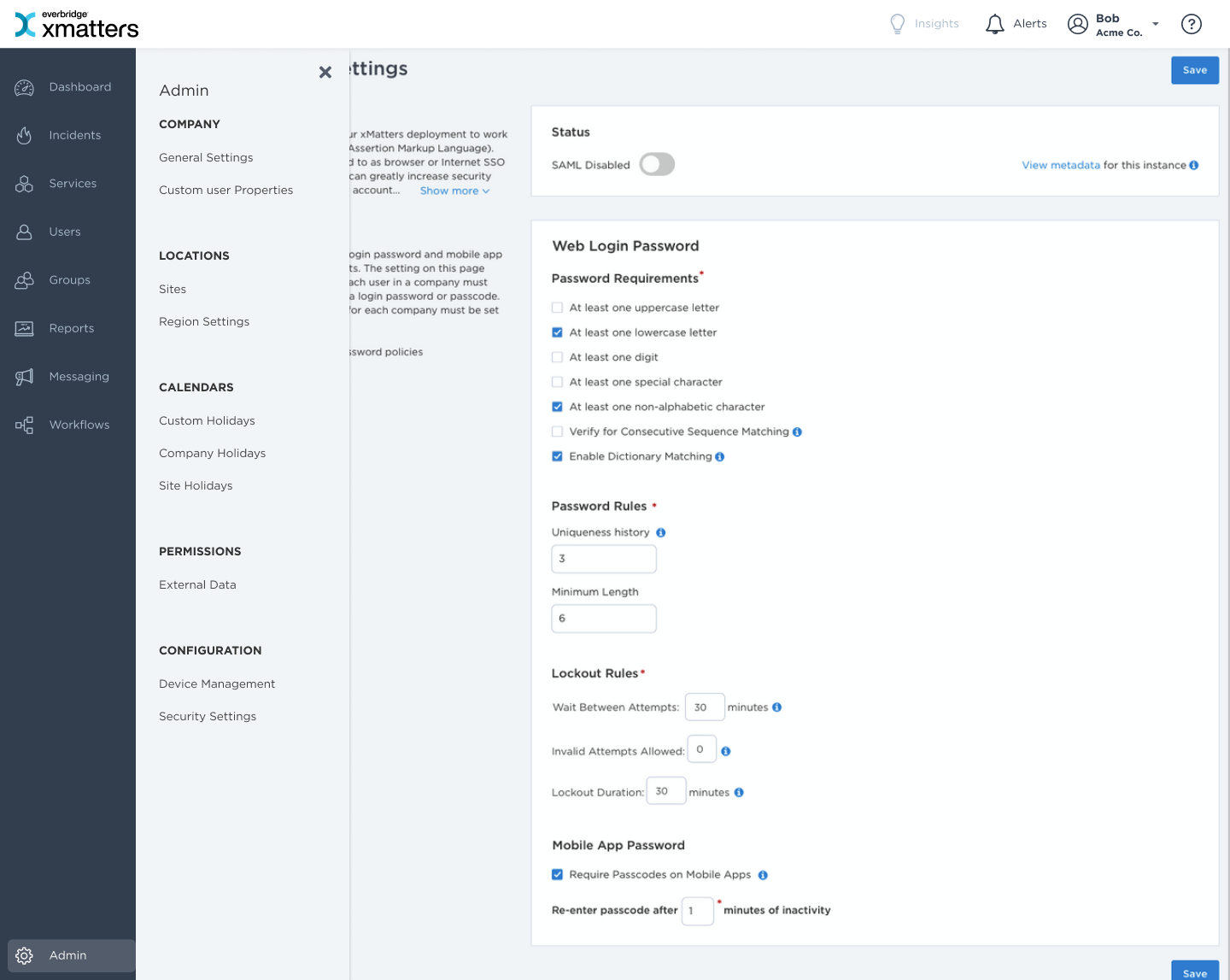
The Admin section was built on an outdated framework and needed to be replaced. The initial request was simple: “Rebuild it.” But the deeper issue wasn’t technical - it was structural. The section had grown over time:
- Related settings and rules split across multiple locations
- Disabled or technical-only options exposed to users
- Inconsistent layouts and patterns
- High cognitive load
Navigation was difficult. Pages were dense. Related settings were separated. Replacing it 1:1 would have preserved the same usability problems.
The Core Design Challenge
This wasn’t a visual refresh. I needed to:
- Audit the entire admin surface area
- Identify redundant or disabled settings
- Reorganize information architecture
- Define scalable layout patterns
- Improve scanability without oversimplifying
The challenge was balancing:
- Backward compatibility
- Technical constraints
- Usability improvements
- Future extensibility
My Role & Approach
The PM brought an early vision and low-fidelity wireframes. We aligned on a preliminary direction, and I partnered closely with engineering to define the architecture and ship iteratively.
I:
- Defined the core interaction model for mapping and configuration
- Structured the information architecture
- Designed reporting and history visibility
- Helped break the feature into incremental releases
We deliberately avoided a “two-year big launch.” Instead, we shipped in increments and this allowed the team to deliver value every few months while evolving the system architecture.
Approach
Audit Before Redesign
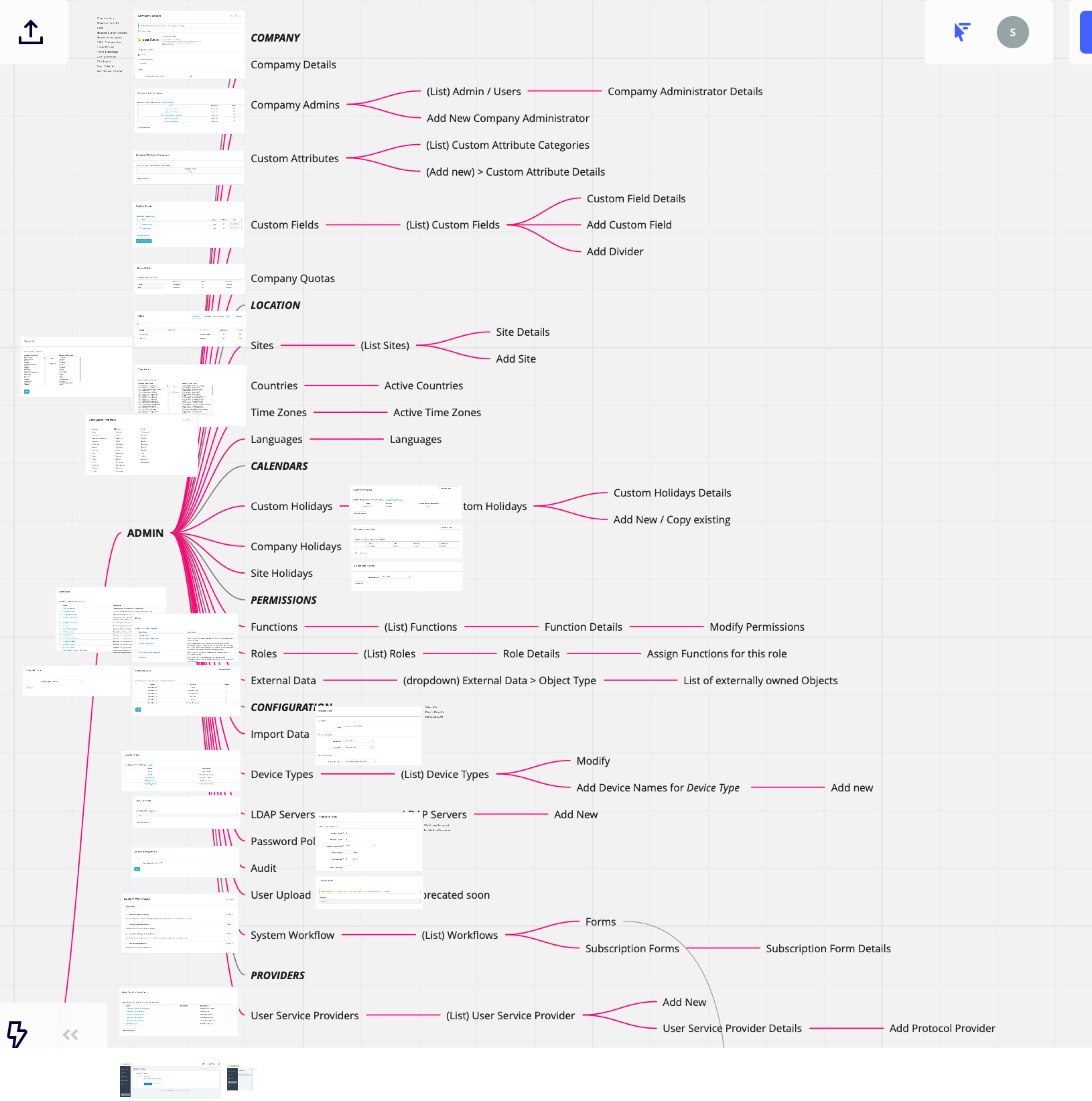
I conducted a full review of all admin pages and settings. Using Pendo usage data (which I also implemented and analyzed), I identified:
- Low-use settings
- Frequently accessed areas
- Confusing navigation patterns
This allowed us to redesign based on behavior, not assumption.
Reorganize Around Mental Models
Instead of preserving legacy grouping, I reshuffled sections based on logical relationships. Examples:
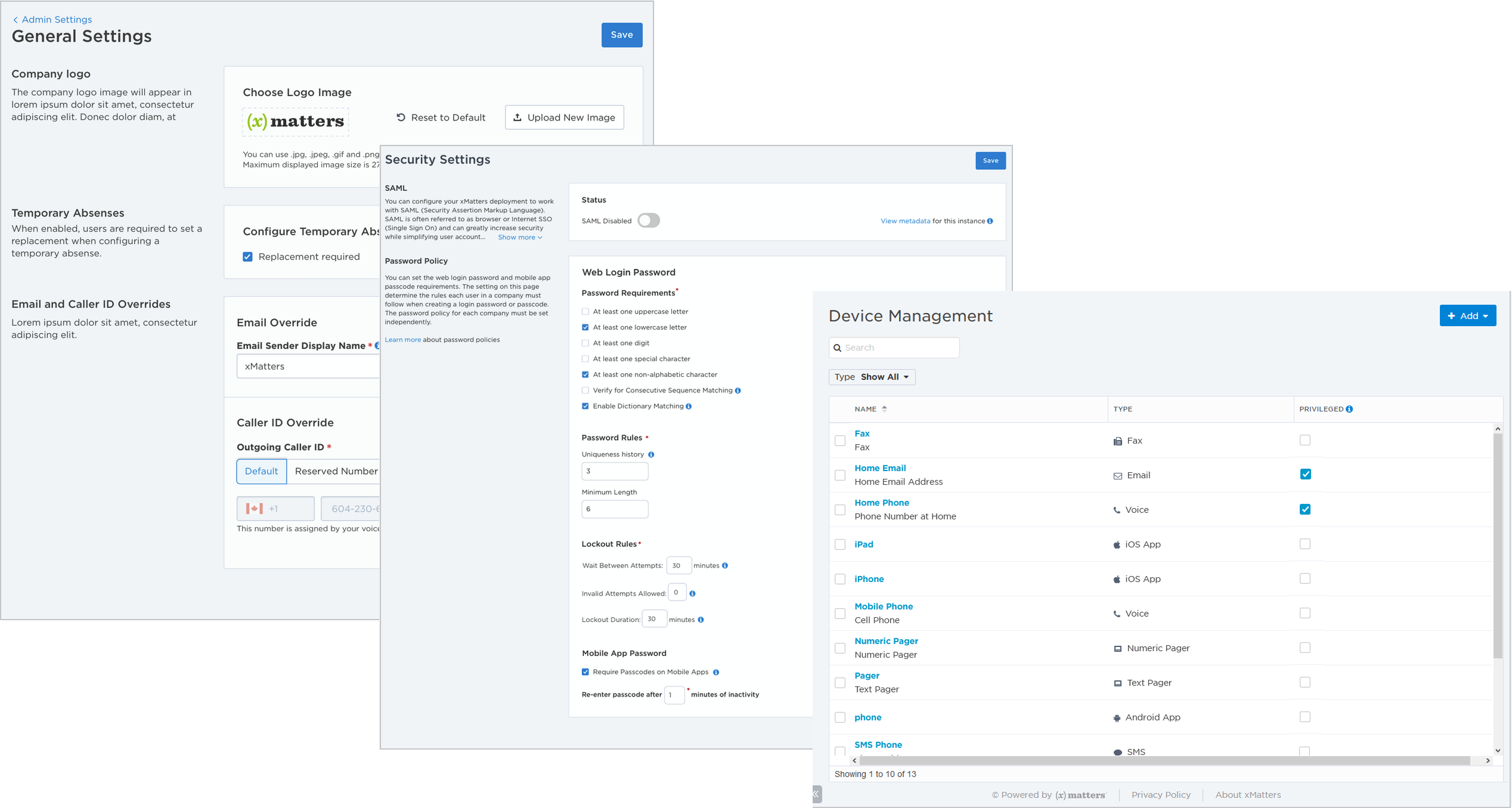
- Consolidated all password-related settings into a single area
- Grouped related configurations together (i.e. Sites, Countries, Languages, Time Zones, Languages)
- Removed or hid technical settings that were disabled or irrelevant
The goal was clarity and predictability.
Define Scalable Design Patterns
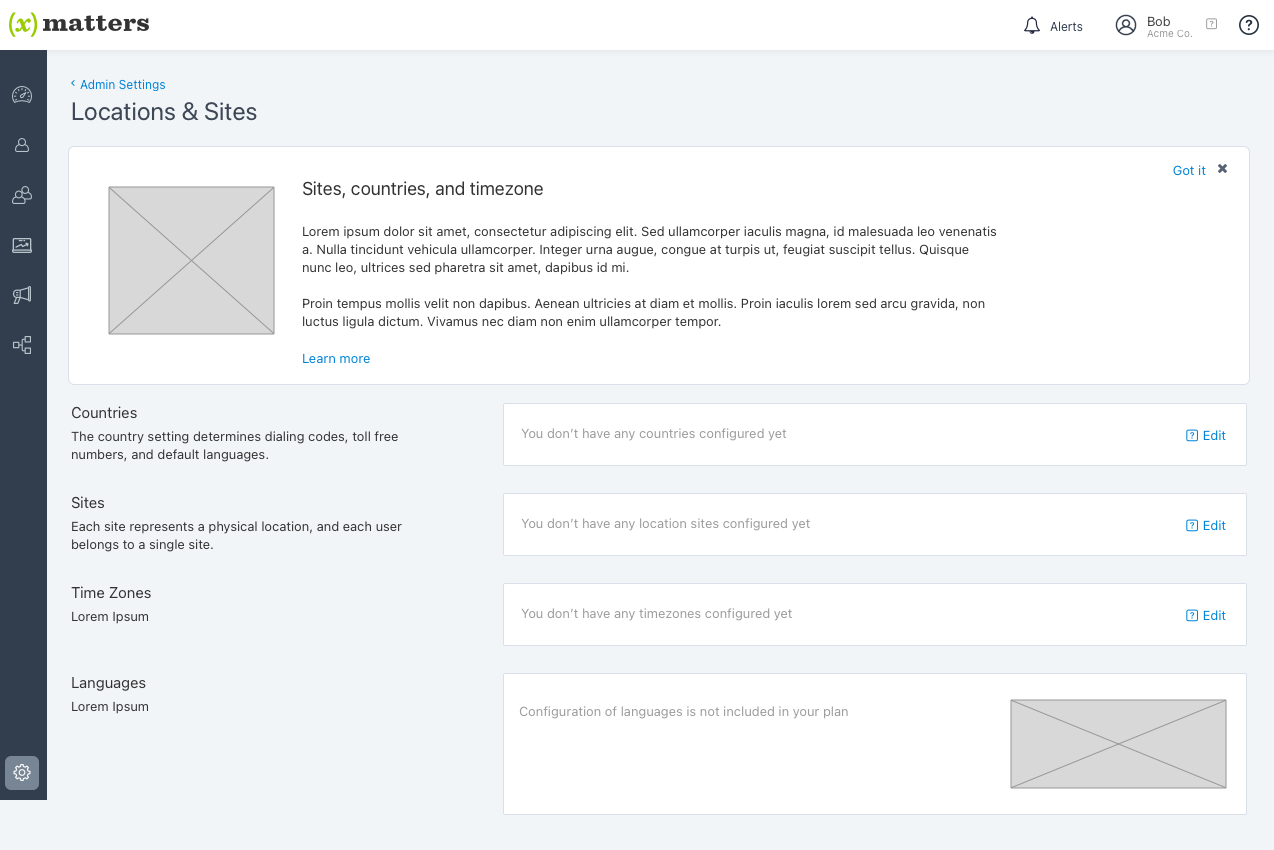
Rather than redesign each page independently, I established repeatable patterns:
Two-column layout (default pattern)
- Left column: setting label and description
- Right column: controls
- Improved scanability and comprehension
Table pattern (for structured configurations)
- Used for settings that required row-based management
These patterns created consistency and made future redesigns significantly easier.
Foundation for a Landing Experience (Planned)
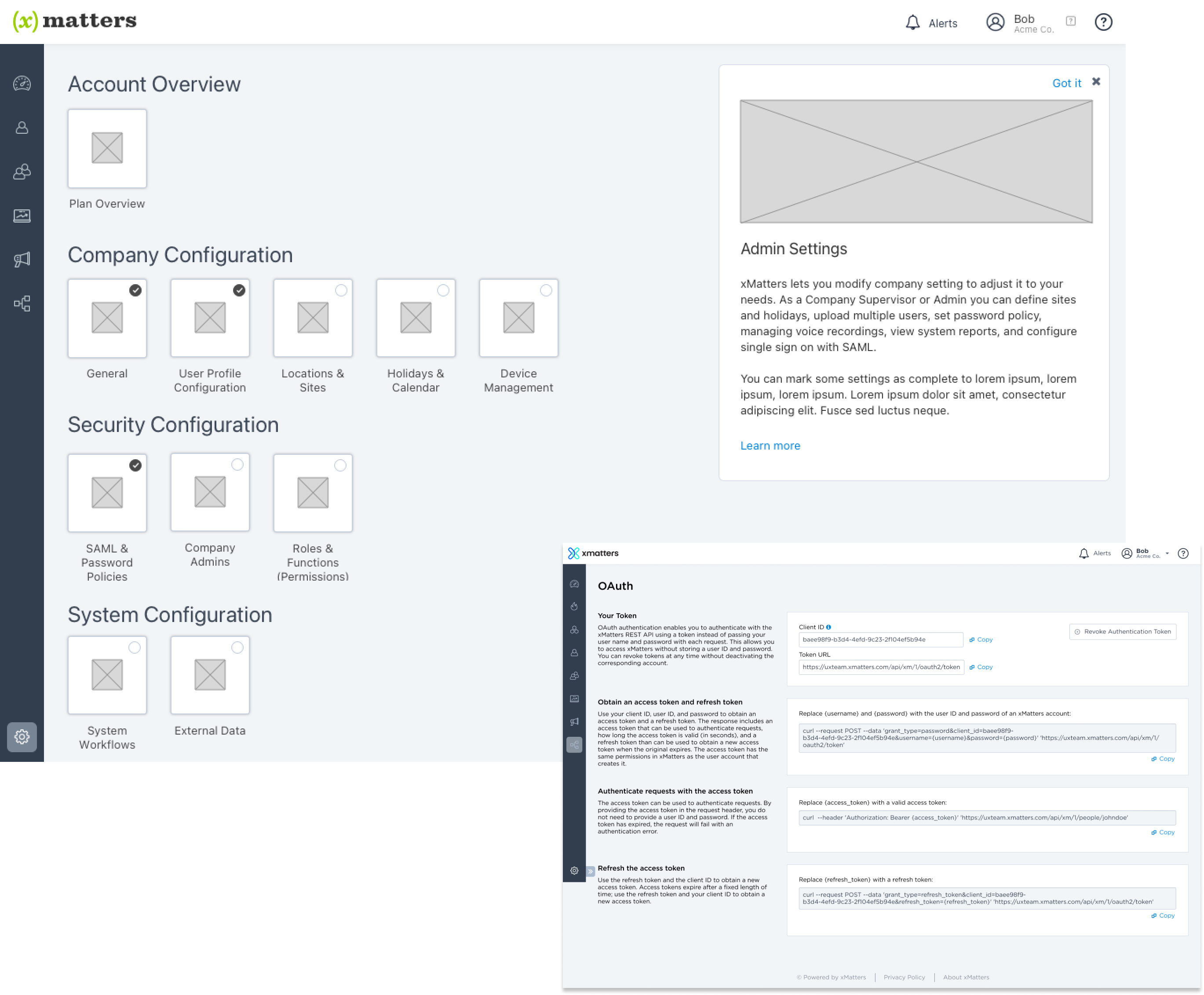
We scoped a centralized Admin landing page to provide:
- Clear section overviews
- Progress indicators
- Better entry points into configuration
Although it was not implemented before I left, the IA groundwork supported it.
Outcome
The Admin section shifted from a fragmented, legacy configuration area to a structured, scalable system. We:
- Reorganized settings around clear mental models
- Consolidated related configurations (e.g., password policies in one place)
- Removed or hid technical/disabled options
- Standardized layouts using repeatable two-column and table patterns
- Reduced navigation friction and cognitive load
-
The result wasn’t just a visual refresh - it was a cleaner foundation. Admin workflows became easier to scan, easier to manage, and easier to extend. Future redesigns no longer require reinvention - the patterns are defined.
Daria Ershova

Admin Section Redesign
Reframing legacy configuration into a scalable system
Role: Lead Product Designer
Scope: IA redesign, system patterns, usability audit
Context: Legacy framework replacement
Problem Space
The Admin section was built on an outdated framework and needed to be replaced. The initial request was simple: “Rebuild it.” But the deeper issue wasn’t technical - it was structural. The section had grown over time:
- Related settings and rules split across multiple locations
- Disabled or technical-only options exposed to users
- Inconsistent layouts and patterns
- High cognitive load
Navigation was difficult. Pages were dense. Related settings were separated. Replacing it 1:1 would have preserved the same usability problems.
The Core Design Challenge
This wasn’t a visual refresh. I needed to:
- Audit the entire admin surface area
- Identify redundant or disabled settings
- Reorganize information architecture
- Define scalable layout patterns
- Improve scanability without oversimplifying
The challenge was balancing:
- Backward compatibility
- Technical constraints
- Usability improvements
- Future extensibility
My Role & Approach
The PM brought an early vision and low-fidelity wireframes. We aligned on a preliminary direction, and I partnered closely with engineering to define the architecture and ship iteratively.
I:
- Defined the core interaction model for mapping and configuration
- Structured the information architecture
- Designed reporting and history visibility
- Helped break the feature into incremental releases
We deliberately avoided a “two-year big launch.” Instead, we shipped in increments and this allowed the team to deliver value every few months while evolving the system architecture.
Approach
Audit Before Redesign
I conducted a full review of all admin pages and settings. Using Pendo usage data (which I also implemented and analyzed), I identified:
- Low-use settings
- Frequently accessed areas
- Confusing navigation patterns
This allowed us to redesign based on behavior, not assumption.
Reorganize Around Mental Models
Instead of preserving legacy grouping, I reshuffled sections based on logical relationships. Examples:
- Consolidated all password-related settings into a single area
- Grouped related configurations together (i.e. Sites, Countries, Languages, Time Zones, Languages)
- Removed or hid technical settings that were disabled or irrelevant
The goal was clarity and predictability.
Define Scalable Design Patterns
Rather than redesign each page independently, I established repeatable patterns:
Two-column layout (default pattern)
- Left column: setting label and description
- Right column: controls
- Improved scanability and comprehension
Table pattern (for structured configurations)
- Used for settings that required row-based management
These patterns created consistency and made future redesigns significantly easier.
Foundation for a Landing Experience (Planned)
We scoped a centralized Admin landing page to provide:
- Clear section overviews
- Progress indicators
- Better entry points into configuration
Although it was not implemented before I left, the IA groundwork supported it.
Outcome
The Admin section shifted from a fragmented, legacy configuration area to a structured, scalable system. We:
- Reorganized settings around clear mental models
- Consolidated related configurations (e.g., password policies in one place)
- Removed or hid technical/disabled options
- Standardized layouts using repeatable two-column and table patterns
- Reduced navigation friction and cognitive load
-
The result wasn’t just a visual refresh - it was a cleaner foundation. Admin workflows became easier to scan, easier to manage, and easier to extend. Future redesigns no longer require reinvention - the patterns are defined.
Daria Ershova
Admin Section Redesign
Reframing legacy configuration into a scalable system
Role: Lead Product Designer
Scope: IA redesign, system patterns, usability audit
Context: Legacy framework replacement
Problem Space
The Admin section was built on an outdated framework and needed to be replaced. The initial request was simple: “Rebuild it.” But the deeper issue wasn’t technical - it was structural. The section had grown over time:
- Related settings and rules split across multiple locations
- Disabled or technical-only options exposed to users
- Inconsistent layouts and patterns
- High cognitive load
Navigation was difficult. Pages were dense. Related settings were separated. Replacing it 1:1 would have preserved the same usability problems.
The Core Design Challenge
This wasn’t a visual refresh. I needed to:
- Audit the entire admin surface area
- Identify redundant or disabled settings
- Reorganize information architecture
- Define scalable layout patterns
- Improve scanability without oversimplifying
The challenge was balancing:
- Backward compatibility
- Technical constraints
- Usability improvements
- Future extensibility
My Role & Approach
The PM brought an early vision and low-fidelity wireframes. We aligned on a preliminary direction, and I partnered closely with engineering to define the architecture and ship iteratively.
I:
- Defined the core interaction model for mapping and configuration
- Structured the information architecture
- Designed reporting and history visibility
- Helped break the feature into incremental releases
We deliberately avoided a “two-year big launch.” Instead, we shipped in increments and this allowed the team to deliver value every few months while evolving the system architecture.
Approach
Audit Before Redesign
I conducted a full review of all admin pages and settings. Using Pendo usage data (which I also implemented and analyzed), I identified:
- Low-use settings
- Frequently accessed areas
- Confusing navigation patterns
This allowed us to redesign based on behaviour, not assumption.
Reorganize Around Mental Models
Instead of preserving legacy grouping, I reshuffled sections based on logical relationships. Examples:
- Consolidated all password-related settings into a single area
- Grouped related configurations together (i.e. Sites, Countries, Languages, Time Zones, Languages)
- Removed or hid technical settings that were disabled or irrelevant
The goal was clarity and predictability.
Define Scalable Design Patterns
Rather than redesign each page independently, I established repeatable patterns:
Two-column layout (default pattern)
- Left column: setting label and description
- Right column: controls
- Improved scanability and comprehension
Table pattern (for structured configurations)
- Used for settings that required row-based management
These patterns created consistency and made future redesigns significantly easier.
Foundation for a Landing Experience (Planned)
We scoped a centralized Admin landing page to provide:
- Clear section overviews
- Progress indicators
- Better entry points into configuration
Although it was not implemented before I left, the IA groundwork supported it.
Outcome
The Admin section shifted from a fragmented, legacy configuration area to a structured, scalable system. We:
- Reorganized settings around clear mental models
- Consolidated related configurations (e.g., password policies in one place)
- Removed or hid technical/disabled options
- Standardized layouts using repeatable two-column and table patterns
- Reduced navigation friction and cognitive load
-
The result wasn’t just a visual refresh - it was a cleaner foundation. Admin workflows became easier to scan, easier to manage, and easier to extend. Future redesigns no longer require reinvention - the patterns are defined.